

Buy a Nintendo eShop Card in Bangladesh with bKash (2026)
You can buy a Nintendo eShop gift card in Bangladesh with bKash, Nagad, Rocket or Upay at Pixel Market BD. Our codes are US Nintendo codes: $10 or $20 of eShop credit, or 3 or 12 months of Nintendo Switch Online. They work on a Nintendo Account set to the United States, and you redeem them on your Switch in under a minute. The $10 credit costs ৳1,300.
Nintendo eShop credit is money for Nintendo's digital store. It goes onto your Nintendo Account, not the console, so it works the same on Switch and Switch 2.
This guide covers everything for 2026:
- which Nintendo code works for you, and how to check your account's country;
- how to buy one with bKash, Nagad, Rocket or Upay;
- how to redeem it on your Switch or online;
- whether to choose eShop credit or Switch Online, and how to fix a code that won't work.
Every Nintendo rule here links to Nintendo's own support pages, so you can check it yourself.
Can you buy a Nintendo eShop gift card with bKash in Bangladesh?
Yes. At Pixel Market BD you pay for US Nintendo eShop credit or a Switch Online code with bKash, Nagad, Rocket or Upay in Taka. The code appears in your account as soon as your payment is confirmed. You don't need a credit card, and you redeem the code yourself on your own Nintendo Account.
At checkout you send the exact amount by mobile banking and type your transaction ID (TrxID). Once we confirm it, the code shows under My codes in your account, and we email it to you too.
Before you pay, check which country your Nintendo Account is set to. The next two sections explain why it matters.
Which Nintendo eShop card works in Bangladesh?
A US Nintendo code works on a Nintendo Account whose country is the United States. Nintendo says eShop cards are specific to a particular country, so they can only be redeemed on systems and accounts set to that same country. It also can't exchange a card for one from another country.
The same rule covers Switch Online codes: they only redeem on accounts set to the region they were made for.
Nintendo also says redeeming needs a Nintendo Account set to a country where the eShop is available, and the United States is one of them. That's why a US account and US codes go together.
How do you check or change your Nintendo Account country?
Sign in on the Nintendo Account website and select User Information. Your country is shown under Profile, as your country or region of residence. If it says United States, our US codes will work. To change it, select Edit, pick the new country and select Save changes.
Nintendo's page on changing your account country lists three things that block a change:
- an unspent Nintendo eShop balance, which you have to spend first;
- auto-renewal turned on for Nintendo Switch Online or another subscription;
- a pre-order that isn't available yet.
Supervised accounts for children under 18 can't change their country on their own. If you're not sure your account is ready for a US code, message us before you pay.
How to buy a Nintendo eShop card in Bangladesh, step by step
You can do all of it from your phone.
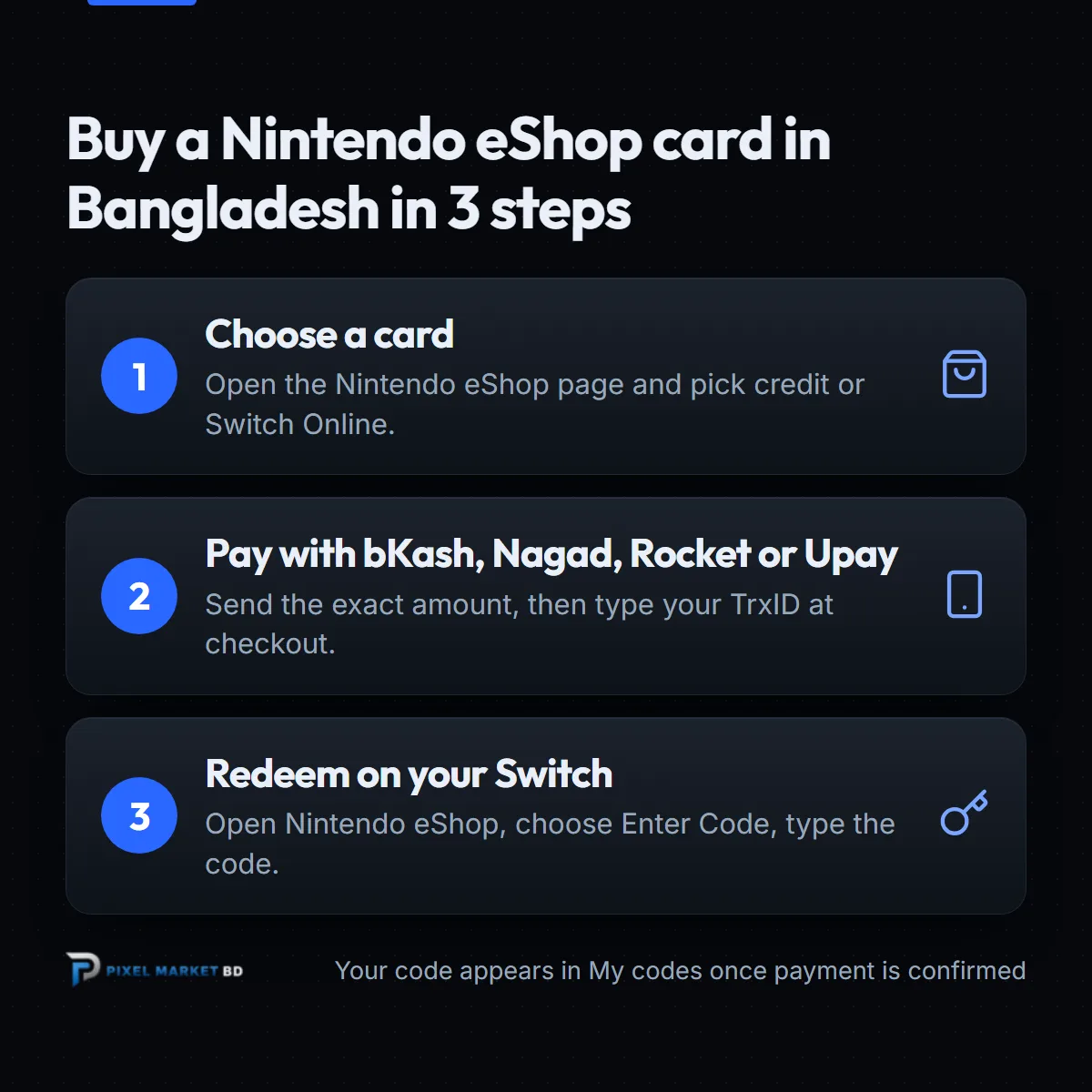
- Create a free account. You need one to buy, so your codes are saved safely. See how to create a Pixel Market BD account.
- Pick your card. Open the Nintendo eShop page and choose $10 or $20 of eShop credit, or 3 or 12 months of Switch Online.
- Pay with bKash, Nagad, Rocket or Upay. Send the exact amount to the number shown at checkout, then type your TrxID. Our guide to placing an order shows every screen.
- Get your code. Once your payment is confirmed, the code appears under My codes, and we email it to you.
- Redeem it. Follow the steps in the next section.
 Nintendo eShop Gift Card BDFrom ৳700Buy now
How do you redeem a Nintendo eShop code?
On your Switch or Switch 2, select Nintendo eShop on the HOME Menu and choose your user. Select Enter Code on the left side of the screen, type the 16-character code and select OK. The credit or membership is added to that Nintendo Account straight away.
These steps come from Nintendo's redeem guide. Your console needs to be connected to the internet first.
Away from your console? Nintendo also lets you redeem online:
- Go to ec.nintendo.com/redeem in a browser and sign in.
- Enter the code and select Next.
- Type your Nintendo Account password again, then select Redeem.
There's one catch: you must have opened the eShop on your console with that account at least once. Nintendo sends a confirmation email when it's done.
Should you buy eShop credit or Switch Online?
Buy eShop credit if you want to choose for yourself: digital games, add-on content, or even a Switch Online membership paid from your balance. Buy a Switch Online code if you already know you want the membership, because it adds 3 or 12 months directly without any extra steps.
Nintendo Switch Online is what you need for online play in most Switch games. It also includes cloud backup for your save data and a library of classic Nintendo games.
Already a member? Nintendo's page on extending a membership says:
- a code for the same plan adds its time to the end of your membership, up to 3 years in total;
- a code for a different plan runs alongside your current one instead of combining.
Which amount should you buy?
Check the price of the game or add-on in the eShop first, then choose credit that covers it. The balance adds up, so two cards work like one bigger one. The $10 credit costs ৳1,300, which is ৳130.00 per US dollar.
Today's prices:
| Card | Price in Taka |
|---|---|
| $10 eShop credit | ৳1,300 |
| $20 eShop credit | ৳2,600 |
| Switch Online, 3 months | ৳1,250 |
| Switch Online, 12 months | ৳2,750 |
Prices follow the US dollar rate, so they can change a little over time. The product page always shows today's price.
What if your Nintendo code doesn't work?
First, check that your Nintendo Account's country is the United States, because a region mismatch is the most common cause. Then make sure you chose the right user on your Switch, and paste the code again from My codes. If it still fails, message us with your order number and a screenshot of the error.
Common problems, based on Nintendo's help pages:
- The code is refused. Your account is set to another country. Check it on the Nintendo Account website.
- "This code has already been used." Nintendo's help page suggests checking each character, since some look alike, and trying again.
- Online redeem doesn't work. Open the eShop on your console once with that account, then try again.
Keep your order page and email until the credit shows. They prove what you bought.
Why buy Nintendo eShop cards from Pixel Market BD?
Pixel Market BD sells official US Nintendo codes that you pay for in Taka with bKash, Nagad, Rocket or Upay. Your code is saved in your account, you never share your Nintendo password, and a real person helps if something goes wrong.
- Local payment. bKash, Nagad, Rocket or Upay, in Taka.
- Codes saved in your account. Lost the email? Open My codes.
- No login needed. We never ask for your Nintendo Account password.
- Help before you buy. Not sure your account is US? Ask us first.
Play on PlayStation or Xbox too? See our PSN gift card guide and Xbox gift card guide, or browse all our gift cards.
The bottom line
A Nintendo eShop card is simple once your Nintendo Account is set up right. Remember three things:
- A US Nintendo code needs a Nintendo Account set to the United States.
- Pay with bKash, Nagad, Rocket or Upay, and copy the code from My codes.
- Redeem it with Enter Code in the Nintendo eShop, or online at ec.nintendo.com/redeem.
Ready? Pick your card on the Nintendo eShop gift card page, and your code lands in your account as soon as your payment is confirmed.
Frequently asked questions
Does a US Nintendo eShop card work in Bangladesh?
Yes, on a Nintendo Account set to the United States. Nintendo says eShop cards only redeem on systems and accounts set to the same country as the card, and it can't exchange a card for another country's. Check your account's country before you buy.
How do I redeem a Nintendo eShop code on my Switch?
Select Nintendo eShop on the HOME Menu and choose your user. Select Enter Code on the left, type the 16-character code and select OK. You can also redeem online at ec.nintendo.com/redeem once you've opened the eShop on your console.
How much is a $10 Nintendo eShop card in Bangladesh?
At Pixel Market BD a $10 Nintendo eShop credit costs ৳1,300 today, paid with bKash, Nagad, Rocket or Upay. Prices follow the US dollar rate, so check the product page for the latest price of every card.
Can I change my Nintendo Account country to the United States?
Yes, on the Nintendo Account website under User Information. Nintendo blocks the change if you have an unspent eShop balance, auto-renewal turned on for a subscription, or a pre-order that isn't out yet, so sort those out first.
Can I add Switch Online time if I'm already a member?
Yes. Nintendo says a code for the same membership plan adds its time to the end of your current membership, up to 3 years in total. A code for a different plan runs alongside your current one instead of combining.